So today I was looking at the old blog to show a coworker and example of something, when I realized that my twitter feed looked strange. Upon closer inspection I realized that I seemed to have been tweeting a lot (and about a lot of very un-PC things). I checked all my settings, fine. I checked my actual twitter account, fine.
What seems to have happened is that some user created a twitter account named "undefined" and then it messed up the twitter feeds (or at least mine). Well, that may be unfair to say. Often when a site encounters an error of some kind it may default those rss settings to "undefined," which in this case was an actual user. Weird, but true.
Anyone else experience a similar problem?
For now, twitter feed removed until further notice. But you can still follow me.
Showing posts with label hack. Show all posts
Showing posts with label hack. Show all posts
Tuesday, September 22, 2009


Wednesday, April 8, 2009
Bounce Rate Breakthrough
Today I'm on jury duty, and so in my vast amount of time sitting around with (and without) my computer, I've been doing some heavy thinking.
I've come up with a theory about improving bounce rates that may revolutionize the web as I know it.
More to come.
I've come up with a theory about improving bounce rates that may revolutionize the web as I know it.
More to come.
The Reasons StumbleUpon Advertising is Ineffective
I think StumbleUpon would like to make all stumblers believe that it is advertising-free, and that the way in which you come across the sites in the database is completely serendipitous, but it simply isn't true.
Now, I'm not knocking the StumbleUpon folks for using adverts, they have to make money just like the rest of us, but the way in which the adverts are displayed is a little sneaky, and a lot ineffective.
For just pennies a view, you can pay StumbleUpon to show your web page to stumblers; you choose the number of views you want a day, and the categories for which you want the ads to show.
The problem is, as a user, I find it very easy to spot the ads. This is simply because stumble allows too many pages from one advertiser to be shown to a user per day.
I stumble a lot, and so sometimes during one day of stumbling I'll come across pages from the same advertiser three or four times. Different pages, mind you, but pages boring and not stumble-worthy enough to keep coming up. I've stumbled enough to know what is interesting enough to sift to the top of the stumble community, and these ads are not it. A parenting site, a crafty blog/site, and a womens magazine are among the most common culprits.
Now, I would appreciate it if stumble simply made a notation on these pages that they were ads, and didn't try to parade them as random acts of stumble, but I know that advertisers want to try and blend in with the usual stuff and would probably reject that idea.
So maybe instead Stumble could limit the number of ads from one advertiser that are shown to a user per day, or maybe Stumble could have a tiny sidebar that is always open that displays "similar" pages to the page you are on that are all sponsored - I could get into that.
Whatever the solution, the current system doesn't work (and I'm too cheap to pay for a stumble account to avoid the ads) and I doubt that it works for many of the advertisers who flood the stumble system with similar boring pages.
Now, I'm not knocking the StumbleUpon folks for using adverts, they have to make money just like the rest of us, but the way in which the adverts are displayed is a little sneaky, and a lot ineffective.
For just pennies a view, you can pay StumbleUpon to show your web page to stumblers; you choose the number of views you want a day, and the categories for which you want the ads to show.
The problem is, as a user, I find it very easy to spot the ads. This is simply because stumble allows too many pages from one advertiser to be shown to a user per day.
I stumble a lot, and so sometimes during one day of stumbling I'll come across pages from the same advertiser three or four times. Different pages, mind you, but pages boring and not stumble-worthy enough to keep coming up. I've stumbled enough to know what is interesting enough to sift to the top of the stumble community, and these ads are not it. A parenting site, a crafty blog/site, and a womens magazine are among the most common culprits.
Now, I would appreciate it if stumble simply made a notation on these pages that they were ads, and didn't try to parade them as random acts of stumble, but I know that advertisers want to try and blend in with the usual stuff and would probably reject that idea.
So maybe instead Stumble could limit the number of ads from one advertiser that are shown to a user per day, or maybe Stumble could have a tiny sidebar that is always open that displays "similar" pages to the page you are on that are all sponsored - I could get into that.
Whatever the solution, the current system doesn't work (and I'm too cheap to pay for a stumble account to avoid the ads) and I doubt that it works for many of the advertisers who flood the stumble system with similar boring pages.
Thursday, January 29, 2009
How to Send Files Without the Internet
Now, rarely am I in a situation where I'm not online, but every so often it happens. Yesterday I needed to send a file from a friend's laptop to my desktop but we were without wireless. Since I wrote the other day about converting word docs into PDF - I thought I'd share another handy and often forgotten feature, bluetooth. No, bluetooth isn't some horrible dental affliction, it is actually a handy way for devices to talk to each other. In some cases, you can use bluetooth to send files without the web.
 If you are using a mac, your bluetooth icon will be in the upper right corner of your screen, it is the "B" like symbol in the picture above. Click on this and choose "send file." You'll then get the option to choose a file to send. Once your file is chosen you'll have to find the device to send it to (the other computer has to have bluetooth enabled for this to work) and your bluetooth screen will show you all bluetooth enabeled devices within range (the other computer or device really needs to be in the same room).
Tip: If names of specific computers don't show up right away (sometimes it'll just say "laptop computer") give it a few seconds, usually it is just reading for a name.
You may then need someone (or yourself) at the other computer to accept the file you are sending (this prevents people from sending you malicious things via bluetooth).
File transfer is pretty quick depending on the computer - so within a minute or two you should be all set.
 If you are using a mac, your bluetooth icon will be in the upper right corner of your screen, it is the "B" like symbol in the picture above. Click on this and choose "send file." You'll then get the option to choose a file to send. Once your file is chosen you'll have to find the device to send it to (the other computer has to have bluetooth enabled for this to work) and your bluetooth screen will show you all bluetooth enabeled devices within range (the other computer or device really needs to be in the same room).
 Tip: If names of specific computers don't show up right away (sometimes it'll just say "laptop computer") give it a few seconds, usually it is just reading for a name.
You may then need someone (or yourself) at the other computer to accept the file you are sending (this prevents people from sending you malicious things via bluetooth).
File transfer is pretty quick depending on the computer - so within a minute or two you should be all set.
Friday, January 23, 2009
How to Convert a Word Doc into a PDF
I've been told that it is possible to convert a word doc into a PDF on a mac, but somehow whenever I need to do that I forget and end up using indesign or something fancy instead.
Today I re-discovered this PDF conversion trick taught to me by many a co-worker and friend over my mac lifetime, so I'd like to share it.
To convert your word doc into PDF open the document in word. Hit "file>print" and you'll see the printing options screen. On the lower left of that screen is a "PDF" button drop down. Choose "save as PDF" and then pick a name.
It is so easy I feel foolish always forgetting this option - I even almost used a paid online pdf converter - yikes!.
Today I re-discovered this PDF conversion trick taught to me by many a co-worker and friend over my mac lifetime, so I'd like to share it.
To convert your word doc into PDF open the document in word. Hit "file>print" and you'll see the printing options screen. On the lower left of that screen is a "PDF" button drop down. Choose "save as PDF" and then pick a name.
It is so easy I feel foolish always forgetting this option - I even almost used a paid online pdf converter - yikes!.
Friday, January 9, 2009
Ways to Make Your Sad Mac Happy
So, my laptop is a couple years old (I think it had its second birthday in October) and until a month ago I'd never had a problem with it. I never knew a mac could be so sad as what I saw in early december, when mine starting making this strange chirp as it would shut off (not when I asked it to, but all on its own). It was the sound of something going horribly wrong (as I'd heard this same phenomenon described by a few friends a coworkers) and could only mean one thing; the hard drive.
The mac geniuses (I don't mean that in a sarcastic way, the repair guys are called geniuses), gave me a new hard drive (and even a new keyboard cover as mine was doing that cracking thing that a lot of macbooks do), and I thought I was home free.
Well, the holidays came and I didn't use the macbook much, so when I picked it up last night to start re-installing all of my old programs (some of which I should write about) I expected everything to go smoothly and it did - for a while.
After twenty minutes I heard that familiar swan song, the chirp and shut off. Then I tried to turn it on again and it gave me the new equivalent of the sad mac, the file folder icon with a question mark (the computer is telling you "what hard drive?").
Anywho, needless to say I was worried, and I spent the better part of today working on an ulcer thinking about how I could make my sad mac happy (I already bought it a new hard drive, I'd given it lavish software gifts, I adorned it with only the softest of laptop cases and used it for only the most important of emails and ims - what more could a mac want?).
So I called Apple, and we went through that old song and dance (does it have power, did I download a macro virus, can I read or write), my genius even had me boot it up PC style (you know, black screen, lots of code) and type in some codes.
After an hour or so of sometimes sad mac, sometimes regular mac, my genius figured it out. My mac was sad because when it got a new hard drive, no one told it how to start again (I guess a mac with a new hard drive would be the equivalent of a person with a new brain - so sometimes you have to teach them things they once knew). So all I had to do was tell it which version of OS X to use to start - and it did - and it was happy.
The mac geniuses (I don't mean that in a sarcastic way, the repair guys are called geniuses), gave me a new hard drive (and even a new keyboard cover as mine was doing that cracking thing that a lot of macbooks do), and I thought I was home free.
Well, the holidays came and I didn't use the macbook much, so when I picked it up last night to start re-installing all of my old programs (some of which I should write about) I expected everything to go smoothly and it did - for a while.
After twenty minutes I heard that familiar swan song, the chirp and shut off. Then I tried to turn it on again and it gave me the new equivalent of the sad mac, the file folder icon with a question mark (the computer is telling you "what hard drive?").
Anywho, needless to say I was worried, and I spent the better part of today working on an ulcer thinking about how I could make my sad mac happy (I already bought it a new hard drive, I'd given it lavish software gifts, I adorned it with only the softest of laptop cases and used it for only the most important of emails and ims - what more could a mac want?).
So I called Apple, and we went through that old song and dance (does it have power, did I download a macro virus, can I read or write), my genius even had me boot it up PC style (you know, black screen, lots of code) and type in some codes.
After an hour or so of sometimes sad mac, sometimes regular mac, my genius figured it out. My mac was sad because when it got a new hard drive, no one told it how to start again (I guess a mac with a new hard drive would be the equivalent of a person with a new brain - so sometimes you have to teach them things they once knew). So all I had to do was tell it which version of OS X to use to start - and it did - and it was happy.
Wednesday, July 2, 2008
Firefox Tabs Just Got Better
The day I learned about browser tabs my online experience changed for the better - new window? no need. Just Cmd T and you can open a new tab.
Last week I learned how to navigate through those tabs - and I've since become a Web browsing master.
Here are some of those tab tricks (this is for Mac users with firefox 2 - if you have firefox 3 or are using windows - check out mozilla's keyboard shortcuts page).
Move to the next tab Ctrl Tab
Move to the tab to the Right Cmd Option Right Arrow Key (Or use Ctrl Tab)
Move to the tab to the Left Cmd Option Left Arrow Key
Ever close a tab on accident? Fear no more - Cmd Shift T will reopen the last tab you closed.
Love every site you have open in your tabs? Cmd Shift D will bookmark them for you.
And, if tabbing just isn't for you - Cmd N will open a new window.
Last week I learned how to navigate through those tabs - and I've since become a Web browsing master.
Here are some of those tab tricks (this is for Mac users with firefox 2 - if you have firefox 3 or are using windows - check out mozilla's keyboard shortcuts page).
Move to the next tab Ctrl Tab
Move to the tab to the Right Cmd Option Right Arrow Key (Or use Ctrl Tab)
Move to the tab to the Left Cmd Option Left Arrow Key
Ever close a tab on accident? Fear no more - Cmd Shift T will reopen the last tab you closed.
Love every site you have open in your tabs? Cmd Shift D will bookmark them for you.
And, if tabbing just isn't for you - Cmd N will open a new window.
Wednesday, April 16, 2008
Maybe Alexa is on to Me
So - just as I'd divulged the secrets of Alexa Rank in my "improve your alexa rank without even trying" post, Alexa went ahead and changed how they rank things (pretty much meaning that they are now gathering data from more than just the alexa toolbar users).
I hope that some of you enjoyed the last few glory days of abusing the toolbar rank system, and I suppose I should have kept my big mouth shut about it (I'm sure the Alexa developers were sweating in their computer chairs as they read my blog and discovered that I'd unlocked the secret of their system).
For some of you this was probably a change in the right direction (I know for my blog it helped me break the 1 million mark - sort of a big deal) - for some it probably had no effect or minimal effect - and for a few it undoubtedly hurt your rank (and for those folks I'm truly sorry - I know that most of my self esteem is based on my alexa rank value). If you feel confused about why change happened - read Alexa's explanation, it's vague but will give you an idea of what's going on now.
Don't worry, as soon as I figure out how to improve your new alexa rank - I'll let everyone know and Alexa will have to come up with a new algorithm yet again (I had no idea I had so much clout in the internet world).
I hope that some of you enjoyed the last few glory days of abusing the toolbar rank system, and I suppose I should have kept my big mouth shut about it (I'm sure the Alexa developers were sweating in their computer chairs as they read my blog and discovered that I'd unlocked the secret of their system).
For some of you this was probably a change in the right direction (I know for my blog it helped me break the 1 million mark - sort of a big deal) - for some it probably had no effect or minimal effect - and for a few it undoubtedly hurt your rank (and for those folks I'm truly sorry - I know that most of my self esteem is based on my alexa rank value). If you feel confused about why change happened - read Alexa's explanation, it's vague but will give you an idea of what's going on now.
Don't worry, as soon as I figure out how to improve your new alexa rank - I'll let everyone know and Alexa will have to come up with a new algorithm yet again (I had no idea I had so much clout in the internet world).
Monday, April 7, 2008
Improve Your Alexa Rank - Without Really Trying
Note: The following tips will work best for smaller sites (such as this blog) with current page ranks higher than a few hundred thousand. However, they wont hurt any site (large or small) so feel free to give them a try.
In the beginning of my journey to Internet expertise, I thought that Alexa rank was the end-all of site rankings, I figured that there was some magic formula used to determine how many people were visiting a site each day - and that that magic formula (much like Google PageRank) would forever remain a mystery to me.
I was wrong.
Alexa rank is (as far as I can tell) limited to the amount of info it can gather from Alexa toolbar users, and in some cases has no real reflection of your actual rank as a site.
Don't believe me? Check out the page on Alexa that discusses how Alexa rank works.
Take special note of the following phrase from the "Some Important Disclaimers" section:
"The traffic data are based on the set of toolbars that use Alexa data, which may not be a representative sample of the global Internet population."
So - what does this mean to you and how can you use these minor flaws to the benefit of your rank?
Well, the "may not be a representative sample" bit is key. Because Alexa has to make an assumption about the number of toolbar users as a percentage of internet users as a whole - smaller sites can tip the scale in their favor.
How? Well, if Alexa assumes that one out of every 100 internet users has an Alexa toolbar (I'm just making up the numbers - but the example still works), and they get data back that says that one Alexa toobar user visited your site each day - they might assume that you get about 100 visits a day. For large sites with a broad appeal and a diverse set of users, these assumptions work just fine.
However, for a very small site (with very low traffic) the assumptions made by the Alexa technology can work in their favor. Lets say a small site gets three visitors a day, if no one that visits your site has an alexa toolbar (not even the creator) it will seem as though the site has no traffic and it will be doomed to remain on the alexa directory with no thumbnail and a horrible page rank. Now, if only one of those three visitors has the toolbar - it will seem to alexa that you have 100 visits a day (based on my made up figures from above). BUT - if all three of the users have the toolbar - it might seem as though you have 300 visitors a day. A great exaggeration from your actual traffic - and a great boost to your self-esteem.
So - for smaller sites - asking your regular userbase (your mom, your friends, etc) to add the Alexa toolbar can greatly inflate your page rank (and thus make all of your visitors super-visitors).
How quickly can you expect results? Well, the rank that you'll see on Alexa is an average of the last three months, so you wont see an immediate jump to whatever your rank is for today, but if you get your few dedicated users to keep coming back and keep using their Alexa toolbars - you'll slowly see your site creep up in rank.
For larger sites, making sure that your userbase is aware of the Alexa toolbar is never a bad idea (especially if your site tends to skew to an older or less web-savvy userbase - you may not be getting counted for all of the users you actually get simply because they aren't using the latest add-on features for their browsers).
Some added bonuses of Alexa add-ons.
If you install "sparky" you can see the Alexa rank of every site you visit and have easy access to the traffic summary pages of the sites you visit.
If everyone that reads this blog post installs an alexa toolbar or add-on, my blog may even get a boost (currently stands at around 2.7 million mark - yikes!).
In the beginning of my journey to Internet expertise, I thought that Alexa rank was the end-all of site rankings, I figured that there was some magic formula used to determine how many people were visiting a site each day - and that that magic formula (much like Google PageRank) would forever remain a mystery to me.
I was wrong.
Alexa rank is (as far as I can tell) limited to the amount of info it can gather from Alexa toolbar users, and in some cases has no real reflection of your actual rank as a site.
Don't believe me? Check out the page on Alexa that discusses how Alexa rank works.
Take special note of the following phrase from the "Some Important Disclaimers" section:
"The traffic data are based on the set of toolbars that use Alexa data, which may not be a representative sample of the global Internet population."
So - what does this mean to you and how can you use these minor flaws to the benefit of your rank?
Well, the "may not be a representative sample" bit is key. Because Alexa has to make an assumption about the number of toolbar users as a percentage of internet users as a whole - smaller sites can tip the scale in their favor.
How? Well, if Alexa assumes that one out of every 100 internet users has an Alexa toolbar (I'm just making up the numbers - but the example still works), and they get data back that says that one Alexa toobar user visited your site each day - they might assume that you get about 100 visits a day. For large sites with a broad appeal and a diverse set of users, these assumptions work just fine.
However, for a very small site (with very low traffic) the assumptions made by the Alexa technology can work in their favor. Lets say a small site gets three visitors a day, if no one that visits your site has an alexa toolbar (not even the creator) it will seem as though the site has no traffic and it will be doomed to remain on the alexa directory with no thumbnail and a horrible page rank. Now, if only one of those three visitors has the toolbar - it will seem to alexa that you have 100 visits a day (based on my made up figures from above). BUT - if all three of the users have the toolbar - it might seem as though you have 300 visitors a day. A great exaggeration from your actual traffic - and a great boost to your self-esteem.
So - for smaller sites - asking your regular userbase (your mom, your friends, etc) to add the Alexa toolbar can greatly inflate your page rank (and thus make all of your visitors super-visitors).
How quickly can you expect results? Well, the rank that you'll see on Alexa is an average of the last three months, so you wont see an immediate jump to whatever your rank is for today, but if you get your few dedicated users to keep coming back and keep using their Alexa toolbars - you'll slowly see your site creep up in rank.
For larger sites, making sure that your userbase is aware of the Alexa toolbar is never a bad idea (especially if your site tends to skew to an older or less web-savvy userbase - you may not be getting counted for all of the users you actually get simply because they aren't using the latest add-on features for their browsers).
Some added bonuses of Alexa add-ons.
If you install "sparky" you can see the Alexa rank of every site you visit and have easy access to the traffic summary pages of the sites you visit.
If everyone that reads this blog post installs an alexa toolbar or add-on, my blog may even get a boost (currently stands at around 2.7 million mark - yikes!).
Monday, March 10, 2008
Stumbling over StumbleUpon

It was the thought of putting one more add-on onto firefox that’s kept me away from StumbleUpon for so long, but today I made the leap.
However, after a few hours of StumblingUpon things - I’m still on the fence about whether or not I'll keep if for a couple reasons:
1. There is the possibility that I will be stumbling from now until eternity (it is a pretty fun way to discover stuff).
2. The interface just isn’t what I expected it to be and I got a little confused in the midst of my site discoveries.
For the sake of blogging, I’m going to focus on the problems with StumbleUpon as I see them – in hopes that someone will “stumbleupon” my suggestions. Why? Because I know that we always want feedback for our site – and enjoy a good round of constructive criticism. Also – I hope my critiques will help a few lost stumblers find their way to successful stumbling.
Here’s where I got tied up
Uploading a photo for my profile – after the upload – there was nothing to click to take me back to my profile – the page just said “photo uploaded successfully” – what did I do? Well, I just hit the stumble icon and went on my merry way.
Back up – just finding my profile for the first time. Yeah – seems simple enough – but the toolbar icons that look like they might lead to my profile actually lead to other stuff – I finally figured out that clicking on the star icon (my favorites) would lead me to one part of my profile and I’ve been using that to navigate back and forth. (click on my profile below to take a peek at what I've been stumbling).
 Stumbling something new – like All the Write Sites – which turned out to be just about the easiest thing ever (just click the thumbs up icon and if no one else has discovered it you’ll get a chance to categorize and review it).
What exactly does “adult” mean? When you stumble something – a question asks you to indicate whether it has adult content or not. So I was stumbling a friend's blog that includes a few curse words and figured that might be considered adult (I didn’t want someone to complain that I wasn’t labeling my stumbles correctly) so I clicked “yes” for adult. Well, little did I know that adult really just means “porn” and will actually just add the “porn” tag to that site – forever if you are the first one to stumble it. So – StumbleUpon – if you mean porn why don’t you just say it? Otherwise well-intentioned folks like myself try to be honest and end up mislabeling content.
I also don’t know why every time I give a site a rating now I get directed to a page with other people that felt the same way I did about it – I’d rather not see those people because frankly I don’t care who else liked
This picture of the world at night – or this time-lapse cityscape.
Not that I don’t want to make new friends – just that I’d rather see more web content than more web profiles. Anywho I think I can turn that function off – I was just
So - for those who are wondering if StumbleUpon is worth the investment (it's free) - it probably is - but don't be afraid to stumble around the toolbar a bit until you have it figured out.
Wednesday, January 23, 2008
Google Alerts: A "Fast" Way to Get Noticed
So, I've got Google Alerts set up to let me know when anyone in the blogosphere is talking about findingDulcinea.com - which makes sense because constantly searching for our site name was driving me a little crazy - and was a less than ideal way to get information.
However, I'm finding a few flaws in the Google Alerts system - specifically that the "alert" should more aptly be named "whenever we get around to letting you know."
For example, about a month ago I did a video for another site highlighting our holiday shopping guide. This was perhaps one of the worst instructional videos ever made - which my friends were happy to tell me - and we put a copy of it on YouTube.
Today - one month after the fact - I got a google alert about the video.
Now, I'm not Father Time or anything, but a month seems like an excessive amount of time for an "alert" - if I'd been waiting for an alert about something more serious - say a tornado warning or an after thanksgiving day sale - I'd be out of luck (and if I'd been in the Wizard of Oz - I'd no longer even be in Kansas).
The other (and perhaps more serious) flaw is that this "alert" has never "alerted" me to any of my own findingdulcinea - related blogging. I'm not sure if you are aware of this, but my blog has a site rank of just under 8 million (and getting better - I might add) and - if you haven't also noticed - is housed under the Google-owned Blogger.
So - okay - my blog rating is terrible (but not as bad as it could be) - but even with a bad rating - wouldn't you expect that google would search it's own family of blogs for the words for which it alerts google users? I would.
Maybe google is sending all of its alerts by old-timey horseback post mail (I was going to say telegraph but realized that even that would get to me almost immediately), maybe my blog in particular is not being searched for google alerts because of its incredible content, or maybe, just maybe, I need to find another blog alert application - any ideas?
I think I'm going to start an experiment called "how long will it take for google to find my findingdulcinea related blog posts?" and when it does maybe I will have a party. And if my alert really does arrive by old-timey horseback post, then perhaps the postman will stay for a slice of cake and some fruit punch.
Until then, we wait.
However, I'm finding a few flaws in the Google Alerts system - specifically that the "alert" should more aptly be named "whenever we get around to letting you know."
For example, about a month ago I did a video for another site highlighting our holiday shopping guide. This was perhaps one of the worst instructional videos ever made - which my friends were happy to tell me - and we put a copy of it on YouTube.
Today - one month after the fact - I got a google alert about the video.
Now, I'm not Father Time or anything, but a month seems like an excessive amount of time for an "alert" - if I'd been waiting for an alert about something more serious - say a tornado warning or an after thanksgiving day sale - I'd be out of luck (and if I'd been in the Wizard of Oz - I'd no longer even be in Kansas).
The other (and perhaps more serious) flaw is that this "alert" has never "alerted" me to any of my own findingdulcinea - related blogging. I'm not sure if you are aware of this, but my blog has a site rank of just under 8 million (and getting better - I might add) and - if you haven't also noticed - is housed under the Google-owned Blogger.
So - okay - my blog rating is terrible (but not as bad as it could be) - but even with a bad rating - wouldn't you expect that google would search it's own family of blogs for the words for which it alerts google users? I would.
Maybe google is sending all of its alerts by old-timey horseback post mail (I was going to say telegraph but realized that even that would get to me almost immediately), maybe my blog in particular is not being searched for google alerts because of its incredible content, or maybe, just maybe, I need to find another blog alert application - any ideas?
I think I'm going to start an experiment called "how long will it take for google to find my findingdulcinea related blog posts?" and when it does maybe I will have a party. And if my alert really does arrive by old-timey horseback post, then perhaps the postman will stay for a slice of cake and some fruit punch.
Until then, we wait.
Sunday, January 13, 2008
Get Rid of Ads on Your Gmail
I always feel slightly intruded upon whenever I see ads targeted at my e-mail content. Now, I know that it is only a computer program that sifts through my e-mail on Gmail and serves up related ads - but nonetheless I always feel a little annoyed (especially when it interprets every reference to findingDulcinea as proof that I must be looking for Don Quixote memorabilia - which - if you are - we have a Don Quixote Guide for).
So - anyhow - you can't turn off all of those annoying google ads - but you can turn off the one on the top of your e-mail inbox (which google refers to as "Web clips").
Here is an example of what they look like (the "Web clip" is the top one and my e-mail subject - which google used to generate the web clip - is the lower one).
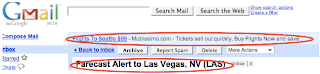
See how google knew that I was looking for flights? Well, to me that is just annoying.
So, I decided to turn that feature off.
Go to your "settings" in gmail - you can find that button in the upper right corner of your gmail screen:

(Also - by the way - I'm using the All the Write Sites e-mail address for this - feel free to send me feedback anytime you like).
So, once on your settings page, you should click on the "Web clips" tab - and the page should look like this (minus the red circles - I added those):
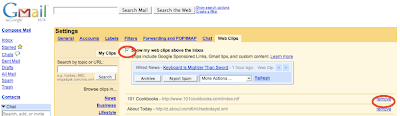
(Sorry about the low-resolution image here - but you get the general idea).
The two area's I've circled in red are the check box to turn off the Web Clips completely, and the option to remove just certain Web clip providers.
The reason that I chose to turn off all Web clips? Because even if I "remove" a few listed providers I still have to look at the random paid Web clips (like the one in my example above) - and you can't turn those off without turning off the whole feature.
So - anyhow - you can't turn off all of those annoying google ads - but you can turn off the one on the top of your e-mail inbox (which google refers to as "Web clips").
Here is an example of what they look like (the "Web clip" is the top one and my e-mail subject - which google used to generate the web clip - is the lower one).

See how google knew that I was looking for flights? Well, to me that is just annoying.
So, I decided to turn that feature off.
Go to your "settings" in gmail - you can find that button in the upper right corner of your gmail screen:

(Also - by the way - I'm using the All the Write Sites e-mail address for this - feel free to send me feedback anytime you like).
So, once on your settings page, you should click on the "Web clips" tab - and the page should look like this (minus the red circles - I added those):

(Sorry about the low-resolution image here - but you get the general idea).
The two area's I've circled in red are the check box to turn off the Web Clips completely, and the option to remove just certain Web clip providers.
The reason that I chose to turn off all Web clips? Because even if I "remove" a few listed providers I still have to look at the random paid Web clips (like the one in my example above) - and you can't turn those off without turning off the whole feature.
Subscribe to:
Posts (Atom)