I think StumbleUpon would like to make all stumblers believe that it is advertising-free, and that the way in which you come across the sites in the database is completely serendipitous, but it simply isn't true.
Now, I'm not knocking the StumbleUpon folks for using adverts, they have to make money just like the rest of us, but the way in which the adverts are displayed is a little sneaky, and a lot ineffective.
For just pennies a view, you can pay StumbleUpon to show your web page to stumblers; you choose the number of views you want a day, and the categories for which you want the ads to show.
The problem is, as a user, I find it very easy to spot the ads. This is simply because stumble allows too many pages from one advertiser to be shown to a user per day.
I stumble a lot, and so sometimes during one day of stumbling I'll come across pages from the same advertiser three or four times. Different pages, mind you, but pages boring and not stumble-worthy enough to keep coming up. I've stumbled enough to know what is interesting enough to sift to the top of the stumble community, and these ads are not it. A parenting site, a crafty blog/site, and a womens magazine are among the most common culprits.
Now, I would appreciate it if stumble simply made a notation on these pages that they were ads, and didn't try to parade them as random acts of stumble, but I know that advertisers want to try and blend in with the usual stuff and would probably reject that idea.
So maybe instead Stumble could limit the number of ads from one advertiser that are shown to a user per day, or maybe Stumble could have a tiny sidebar that is always open that displays "similar" pages to the page you are on that are all sponsored - I could get into that.
Whatever the solution, the current system doesn't work (and I'm too cheap to pay for a stumble account to avoid the ads) and I doubt that it works for many of the advertisers who flood the stumble system with similar boring pages.
Showing posts with label remove advertising. Show all posts
Showing posts with label remove advertising. Show all posts
Wednesday, April 8, 2009


Sunday, January 13, 2008
Get Rid of Ads on Your Gmail
I always feel slightly intruded upon whenever I see ads targeted at my e-mail content. Now, I know that it is only a computer program that sifts through my e-mail on Gmail and serves up related ads - but nonetheless I always feel a little annoyed (especially when it interprets every reference to findingDulcinea as proof that I must be looking for Don Quixote memorabilia - which - if you are - we have a Don Quixote Guide for).
So - anyhow - you can't turn off all of those annoying google ads - but you can turn off the one on the top of your e-mail inbox (which google refers to as "Web clips").
Here is an example of what they look like (the "Web clip" is the top one and my e-mail subject - which google used to generate the web clip - is the lower one).
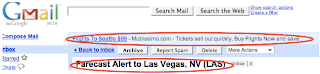
See how google knew that I was looking for flights? Well, to me that is just annoying.
So, I decided to turn that feature off.
Go to your "settings" in gmail - you can find that button in the upper right corner of your gmail screen:

(Also - by the way - I'm using the All the Write Sites e-mail address for this - feel free to send me feedback anytime you like).
So, once on your settings page, you should click on the "Web clips" tab - and the page should look like this (minus the red circles - I added those):
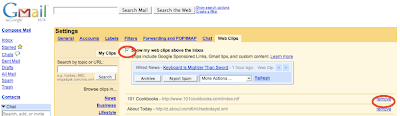
(Sorry about the low-resolution image here - but you get the general idea).
The two area's I've circled in red are the check box to turn off the Web Clips completely, and the option to remove just certain Web clip providers.
The reason that I chose to turn off all Web clips? Because even if I "remove" a few listed providers I still have to look at the random paid Web clips (like the one in my example above) - and you can't turn those off without turning off the whole feature.
So - anyhow - you can't turn off all of those annoying google ads - but you can turn off the one on the top of your e-mail inbox (which google refers to as "Web clips").
Here is an example of what they look like (the "Web clip" is the top one and my e-mail subject - which google used to generate the web clip - is the lower one).

See how google knew that I was looking for flights? Well, to me that is just annoying.
So, I decided to turn that feature off.
Go to your "settings" in gmail - you can find that button in the upper right corner of your gmail screen:

(Also - by the way - I'm using the All the Write Sites e-mail address for this - feel free to send me feedback anytime you like).
So, once on your settings page, you should click on the "Web clips" tab - and the page should look like this (minus the red circles - I added those):

(Sorry about the low-resolution image here - but you get the general idea).
The two area's I've circled in red are the check box to turn off the Web Clips completely, and the option to remove just certain Web clip providers.
The reason that I chose to turn off all Web clips? Because even if I "remove" a few listed providers I still have to look at the random paid Web clips (like the one in my example above) - and you can't turn those off without turning off the whole feature.
Subscribe to:
Posts (Atom)

