I always enjoy a good prank on April Fools' Day, although rarely pull any myself for fear of insulting someone or getting myself into trouble. Reflecting upon a few of yesterday's jokes, I thought I'd share some of my favorite April Fools' Day jokes from the web.
1. Google. Each year Google does its best to make us laugh, and usually it works. Yesterday's introduction of Autopilot and CADIE was one of my all time favorites (read more about the round-the-world google hoaxes, including using thousands of pigeons to collect google maps data). Other google favorites include pigeon rank and google gulp.
2. Sitepoint let everyone know that the Internet was going to reboot - hold on to your hats!
3. Familylink used its facebook app, we're related, to let millions of users know that Barack Obama had confirmed them as a fourth cousin.
4. ThinkGeek makes up stuff, SqueezeBacon, Unicorn Chaser, and even a USB pet rock.
5. Woot offered a bag of random crap for the unbeatably low shipping price of 1 million dollars.
6. Youtube's videos were upside down (although this sort of counts as google).
7. Reddit made itself look like digg, calling the redesign a "long overdue update"
8. The Guardian moves completely to a twitter platform.
9. Pirate Bay is purchased by Warner Bros.
10. UCSD students who were rejected from college get a "congratulations" email (oh wait, that wasn't an april fools' day joke, but just an unfortunate accident).
Showing posts with label gmail. Show all posts
Showing posts with label gmail. Show all posts
Thursday, April 2, 2009


Sunday, January 13, 2008
Get Rid of Ads on Your Gmail
I always feel slightly intruded upon whenever I see ads targeted at my e-mail content. Now, I know that it is only a computer program that sifts through my e-mail on Gmail and serves up related ads - but nonetheless I always feel a little annoyed (especially when it interprets every reference to findingDulcinea as proof that I must be looking for Don Quixote memorabilia - which - if you are - we have a Don Quixote Guide for).
So - anyhow - you can't turn off all of those annoying google ads - but you can turn off the one on the top of your e-mail inbox (which google refers to as "Web clips").
Here is an example of what they look like (the "Web clip" is the top one and my e-mail subject - which google used to generate the web clip - is the lower one).
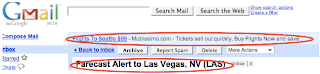
See how google knew that I was looking for flights? Well, to me that is just annoying.
So, I decided to turn that feature off.
Go to your "settings" in gmail - you can find that button in the upper right corner of your gmail screen:

(Also - by the way - I'm using the All the Write Sites e-mail address for this - feel free to send me feedback anytime you like).
So, once on your settings page, you should click on the "Web clips" tab - and the page should look like this (minus the red circles - I added those):
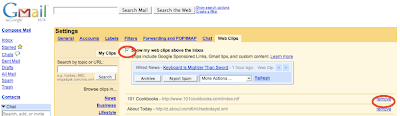
(Sorry about the low-resolution image here - but you get the general idea).
The two area's I've circled in red are the check box to turn off the Web Clips completely, and the option to remove just certain Web clip providers.
The reason that I chose to turn off all Web clips? Because even if I "remove" a few listed providers I still have to look at the random paid Web clips (like the one in my example above) - and you can't turn those off without turning off the whole feature.
So - anyhow - you can't turn off all of those annoying google ads - but you can turn off the one on the top of your e-mail inbox (which google refers to as "Web clips").
Here is an example of what they look like (the "Web clip" is the top one and my e-mail subject - which google used to generate the web clip - is the lower one).

See how google knew that I was looking for flights? Well, to me that is just annoying.
So, I decided to turn that feature off.
Go to your "settings" in gmail - you can find that button in the upper right corner of your gmail screen:

(Also - by the way - I'm using the All the Write Sites e-mail address for this - feel free to send me feedback anytime you like).
So, once on your settings page, you should click on the "Web clips" tab - and the page should look like this (minus the red circles - I added those):

(Sorry about the low-resolution image here - but you get the general idea).
The two area's I've circled in red are the check box to turn off the Web Clips completely, and the option to remove just certain Web clip providers.
The reason that I chose to turn off all Web clips? Because even if I "remove" a few listed providers I still have to look at the random paid Web clips (like the one in my example above) - and you can't turn those off without turning off the whole feature.
Subscribe to:
Posts (Atom)

